Is Cloud-Based Invoice Management Right for Your Business?
Businesses worldwide are ditching spreadsheets and paper-based billing at record speed — but switching to cloud invoicing isn’t a magic wand. This analysis cuts through the marketing noise, pulls in real user experiences, and gives you a clear-eyed answer: when it works brilliantly, when it doesn’t, and what to watch for before you sign up.
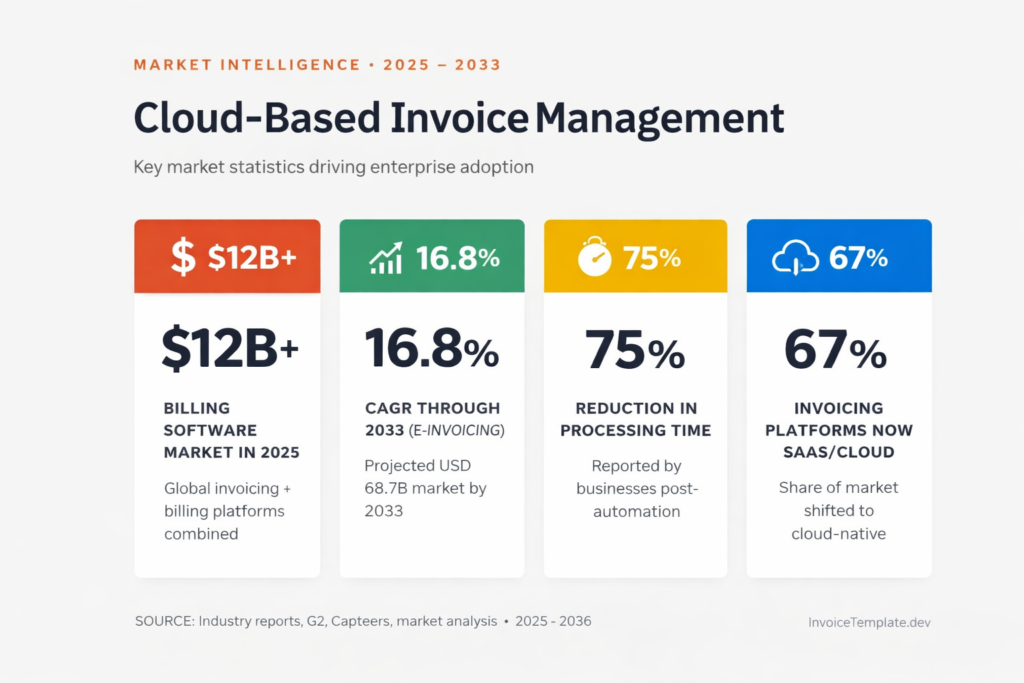
$12B+ Billing software market in 2025
16.8% CAGR through 2033 (e-invoicing)
75% Reduction in processing time reported
67% of invoicing platforms now SaaS/cloud
The Big Picture: Why Businesses Are Moving to the Cloud
Let’s start with the numbers, because they tell a compelling story. The cloud-based invoicing software market is rapidly expanding, valued at USD 15.9 billion in 2024 and expected to grow at a compound annual growth rate of 16.8% from 2025 to 2033, potentially reaching USD 68.7 billion. That kind of growth doesn’t happen unless the product is actually solving a real problem.
And the problem is very real. Traditional approaches to invoice processing, reliant on manual data entry and paper or email-based workflows, are inefficient and unsustainable — not only slowing down operations but also exposing organizations to costly errors and fraud. Most business owners who’ve spent a Friday afternoon hunting for a missing paper invoice will tell you that without prompting.
As of 2024, 63% of SMB workloads and 62% of SMB data are already hosted in the cloud, which means the question for most businesses isn’t “should I consider the cloud?” — it’s “which tool and when?”
What Cloud Invoice Management Actually Does
Before we get into the pros and cons, it helps to be precise about what these platforms do. This isn’t just “sending a PDF invoice by email.”
Cloud invoice management enables businesses to create, send, and manage invoices electronically, while automating various stages of the processing cycle — including data entry, approval workflows, and payment processing — and allowing users to access invoice data and perform tasks from anywhere.
Modern platforms go further. Invoice automation uses software to handle data capture, validation, approval routing, exception handling, reminders, and reconciliation with minimal human involvement. AI-powered tools can now extract data from scanned invoices, match them to purchase orders automatically, and flag anything that looks unusual — without anyone touching a keyboard.
Worth knowing: A well-implemented invoice management system can reduce invoice processing costs by up to 80% and cut approval time from weeks to just a few days. Those are the headline numbers vendors love to quote — and they’re achievable, but typically only after a solid implementation and a few months of tuning.
The Honest Pros and Cons
Here’s what the evidence — both from industry research and real user reviews — actually shows:
✓ What Works Well
- Faster invoice processing and fewer bottlenecks
- Real-time cash flow visibility and dashboards
- Automated payment reminders reduce late payments
- Full audit trails simplify tax time and compliance
- Remote-friendly — approve invoices from anywhere
- Scales without proportional staff increases
- Integrates with QuickBooks, Xero, SAP, and ERPs
- AI-assisted data capture reduces manual entry errors
✗ What Can Go Wrong
- Implementation often takes longer than vendors promise
- Customer support quality varies significantly by vendor
- Legacy system integration can be painful and costly
- Per-transaction fees add up at high invoice volumes
- Some platforms have limited reporting customization
- Steep learning curves on enterprise-tier products
- Data residency concerns for regulated industries
- Overkill — and overpriced — for very small operations
Breaking Down the Key Benefits
1. Speed and Efficiency
This is where cloud invoicing delivers most clearly. Automation digitally routes invoices through pre-defined workflows, eliminating delays caused by manual handoffs and lost invoices. Purchasers are notified of pending invoices and alerted as due dates approach, and invoices not reviewed in a pre-set time can be automatically escalated to a manager.
Businesses using invoice management systems report up to a 75% reduction in processing time and a 30% decrease in errors. For a company processing hundreds of invoices monthly, that’s not a marginal improvement — it’s a transformation of how your finance team spends its day.
2. Cash Flow You Can Actually See
One of the most significant benefits of cloud invoice management is improved cash flow. Fast and efficient invoice processing and accurate accounting reduce the chances of delayed or missed payments.
Real-time status tracking — sent, viewed, approved, paid, overdue — improves collections and forecasting. That visibility alone can change how confidently a business owner can plan ahead.
3. Security (Better Than You Might Think)
A common concern is that moving financial data to the cloud is risky. The reality is more nuanced. Leading platforms use encryption, secure infrastructure, multi-factor authentication, and regular audits to protect client and payment data from interception or unauthorized access.
For most small and mid-sized businesses, this level of security is actually better than what they’d have running on a local server or in a spreadsheet emailed around the office.
4. AI Is Genuinely Changing Things
AI tools that extract data directly from documents minimize manual entry, cutting down on errors and speeding up the overall process — a genuine quality-of-life improvement that early users of these platforms consistently highlight. The days of someone manually typing in invoice line items are rapidly ending.
What Real Users Are Saying
Vendor marketing is one thing. Let’s look at what users on G2, Capterra, and other review platforms actually say — including the frustrations.
BILL’s AP features solve several key problems, streamlining invoice processing and automating approvals. The AI tool that extracts data directly from documents minimizes manual entry, cutting down on errors and speeding up the overall process.— Accounting specialist, G2 review of BILL
But that same reviewer flagged a downside: BILL’s reporting capabilities are limited and lack customization for more detailed analysis. This is a recurring theme across multiple platforms — the core automation works well, but finance teams that need granular reporting often find themselves constrained.
Stampli users tell a similar story — strong on automation, strong on collaboration, but may not be the best solution for small businesses with limited resources who may prefer simpler or less comprehensive accounts payable solutions. The tool that’s perfect for a 50-person company might be bewildering overkill for a 5-person one.
The most painful user experiences tend to involve implementation. One Tipalti user described a rough implementation that took almost a year — a process the vendor said would take 6 weeks but which actually took 6 months, and reflected that better vetting of an implementation partner would have helped. That’s an extreme case, but it illustrates a risk that’s worth taking seriously. Implementation timelines in vendor sales decks are almost always optimistic.
Couldn’t tell you if the system itself is any good or not, because we have been working on the integration since April of 2024 — and we still have not completed the integration.— CFO, Capterra review of SAP Concur
On the customer support side, recent complaints from some platforms highlight unresponsive communication channels and unresolved payment issues — a significant weakness for software handling sensitive financial transactions. Multiple users have reported problems reaching support staff, unanswered emails, and difficulties getting timely help when problems occur.
The lesson isn’t that cloud invoicing is unreliable. It’s that vendor selection and implementation quality matter as much as the software itself. The best platform with a poor rollout will underperform a mid-tier platform with a thoughtful one.
The Leading Platforms: Who’s Who in 2025–2026
A quick map of the landscape — roughly matched to business size and use case:
QuickBooks / Xero
Small Business · Best All-Rounder
Accounting-first platforms with solid invoicing built in. Best for businesses that want one tool for everything.
FreshBooks / Zoho Invoice
Freelancers · Very Small Teams
Clean, simple, and affordable. Zoho Invoice even has a free tier. Great starting points without the enterprise complexity.
BILL (formerly Bill.com)
SMB · AP Automation Focus
Strong AI-powered invoice capture and approval workflows. Reporting is a known limitation; good for volume processing.
Tipalti
Mid-Market · Global Payments
Powerful for companies paying global vendors. Implementation can be long — vet your rollout partner carefully.
Stampli
Mid-Market · Collaboration-First
Praised for ease of use and customer support. More AP tool than standalone invoicing; overkill for very small teams.
SAP Concur / Sage Intacct
Enterprise · Complex Finance Ops
Comprehensive, audit-ready, and deeply integrated. Steep learning curve; substantial IT investment required.
In 2025, pricing varies widely — from free plans with basic functionality to enterprise solutions costing several hundred dollars per month. For small to mid-sized businesses, typical monthly plans run from approximately $15 to $60 per user. The total cost of ownership, however, should factor in implementation, training, and the time your team will spend during the transition.
When It Makes Sense — and When It Doesn’t
Go for it if…
You’re processing more than 30–50 invoices a month and finding manual tracking stressful. Your team is remote or distributed and approval delays are slowing your payments. You want real-time visibility into what’s owed, what’s overdue, and where your cash flow is headed. You’re growing and need a system that scales with you without proportional admin overhead.
Hold off if…
You’re a solo operator or very small business with under 15 invoices a month — a simple accounting tool or even a well-structured spreadsheet may serve you just as well for now. You’re in a heavily regulated industry with strict data residency requirements (healthcare, government contracting, certain financial services) — verify compliance before signing. Or if your budget is extremely tight: integration with legacy systems and the need for user training and change management present real upfront challenges.
SME insight: SMEs remain the largest customer segment for invoice processing software. After accounting for 44.9% of global market revenue in 2025, small and medium-sized businesses continue to drive adoption in 2027 as cloud-based automation, AI-powered invoice capture, and subscription pricing make advanced finance tools accessible without enterprise-sized budgets.
Five Questions to Ask Before You Commit
If you’re ready to evaluate platforms, these are the questions that will save you headaches later:
1. What’s the real implementation timeline? Ask for customer references from businesses similar to yours — not testimonials the vendor handpicks — and ask those customers directly how long it actually took.
2. How does it integrate with your existing tools? About 34% of businesses face challenges integrating new invoicing systems with existing accounting platforms. Get a technical confirmation in writing that your specific software stack is supported, not just a salesperson’s assurance.
3. What happens to your data if you leave? Data portability matters. Make sure you can export your invoice history in a usable format — ideally CSV or XML — before you’re locked in.
4. How is support actually structured? Is there a phone number? A dedicated account manager above a certain tier? Read recent support reviews, not just product reviews. The product may be excellent and the support terrible.
5. Do the math on total cost? Monthly subscription fees are visible. Training time, implementation costs, and transaction fees (which can hit 2–3% per payment) are less obvious. Run a realistic 12-month number before comparing platforms.
Final Verdict
Cloud-based invoice management is one of the highest-ROI upgrades a growing business can make — provided you choose the right tool for your size, invest properly in implementation, and don’t over-engineer a solution for a problem that’s still small.
For businesses processing meaningful invoice volumes, the time saved, errors avoided, and cash flow visibility gained typically justify the cost within a few months. For solo operators or businesses just getting started, simpler tools exist and may serve you just as well for now.
The risk isn’t in cloud invoicing itself. It’s in rushing the vendor selection, underestimating the transition, or assuming that enterprise platforms are better just because they cost more. Match the tool to the problem — and read the reviews before you sign.
This article draws on market research from multiple industry reports, platform documentation, and aggregated user reviews from G2, Capterra, and Trustpilot as of Q1 2026. Market statistics are projections and may vary by source methodology. © 2026 · Cloud Invoice Management Analysis · For informational purposes only